Pick the film.
Claude makes it.

RasanAI is a Claude Code skill for entire videos: launch films, explainers, PR videos, music videos, reels cut from your own footage, motion graphics. You make five calls and see your film at each one. Behind them, a crew of agents researches your product, writes the scripts, scores every shot and animates every scene in parallel. Claude lists each decision with its reason and checks the film for AI-video tells before you see it.

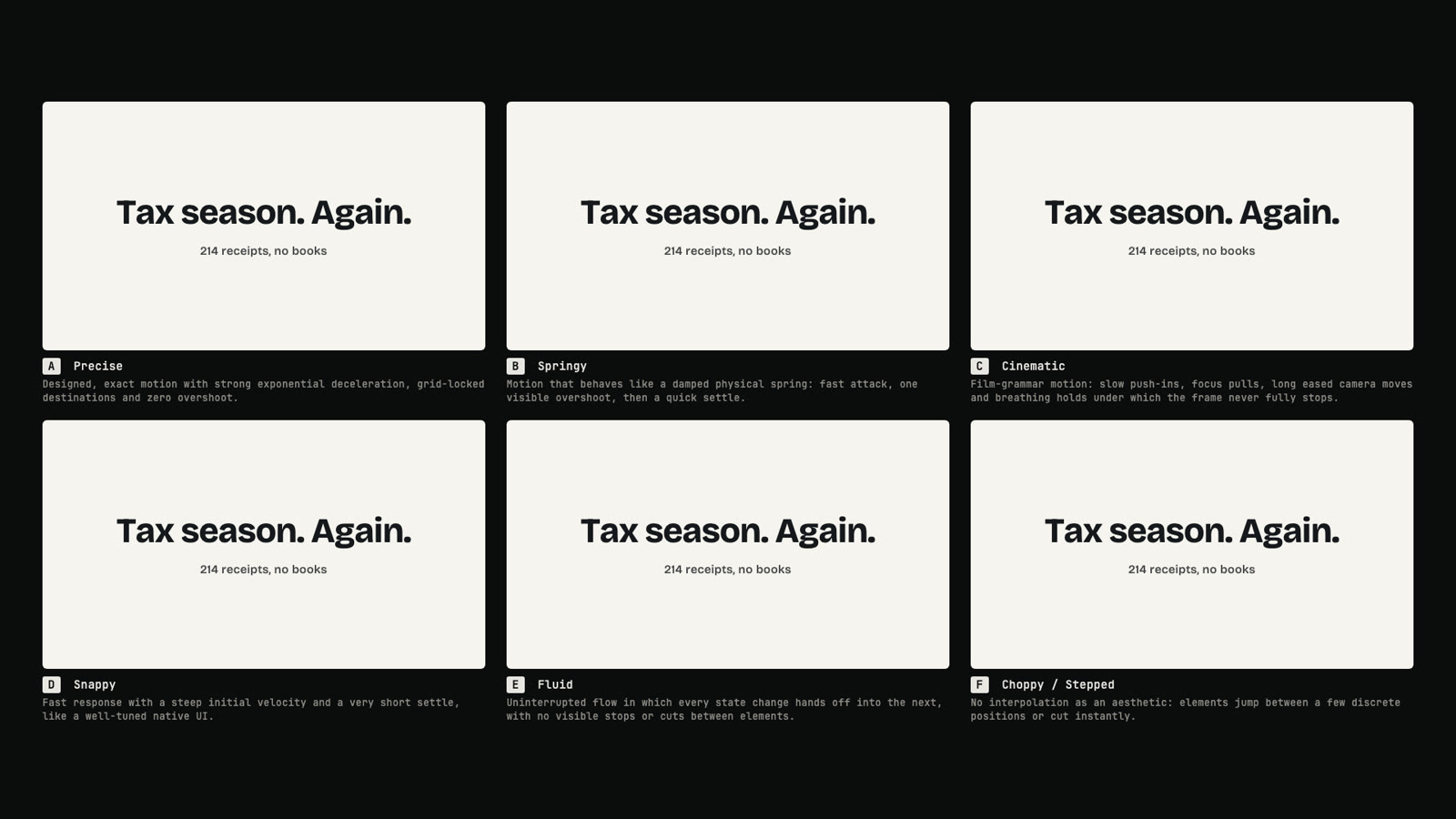
One four-scene film, six motion languages. Swatches to choose by eye; the real film is Claude's.
Preciseexpo.out · 200–1000 ms · no overshoot
Elasticback.out · overshoot allowed
Cinematicpower2 · 400–2400 ms · long holds
Liquidpower4.inOut · continuous
Snappypower4.out · 120–800 ms
Choppy / steppedsteps(4) · no interpolation

Thirty people make an AI video. They get thirty videos and one film.

The content differs. The film is the same: the obvious story, a default look, everything fading up on one ease, a 30-second music loop under a 45-second film, a whoosh on every cut, glowing text. Viewers now name these tells on sight.

Each one is a default nobody chose. RasanAI replaces every default with a decision, then checks the build against all of them.

  • Hook, problem, "Introducing X", three features, call to actionOne of 66 narrative devices, picked from what is true about your product
  • A default lookA named design system, matched to the story
  • Everything fades up on the same easeA motion contract, checked tween by tween
  • A 30-second loop under a 45-second filmA track cut on bar lines that ends when the film ends
  • A whoosh on every cutSound effects only for things you can see happen
  • Glowing textA gate that rejects the look, copy, motion and sound tells
  • A film about the product, from memoryResearch first: its real screens, words, brand and past launch films, every fact sourced
  • Scenes that each look fine and never flowOne motion score for the whole film, every seam designed on both sides
  • The safe, forgettable defaultA crew pushed to show off, and critics that fail competent-but-safe work

How it runs

Five calls. You see your film at every one.

You type /rasanai make a 45s launch film for tally.app. A Director's Console opens in your browser, shows what Claude is doing as it works, and stops you five times. The story and the look are separate calls: the script is judged as words and timing first.

  1. 1

    Brief

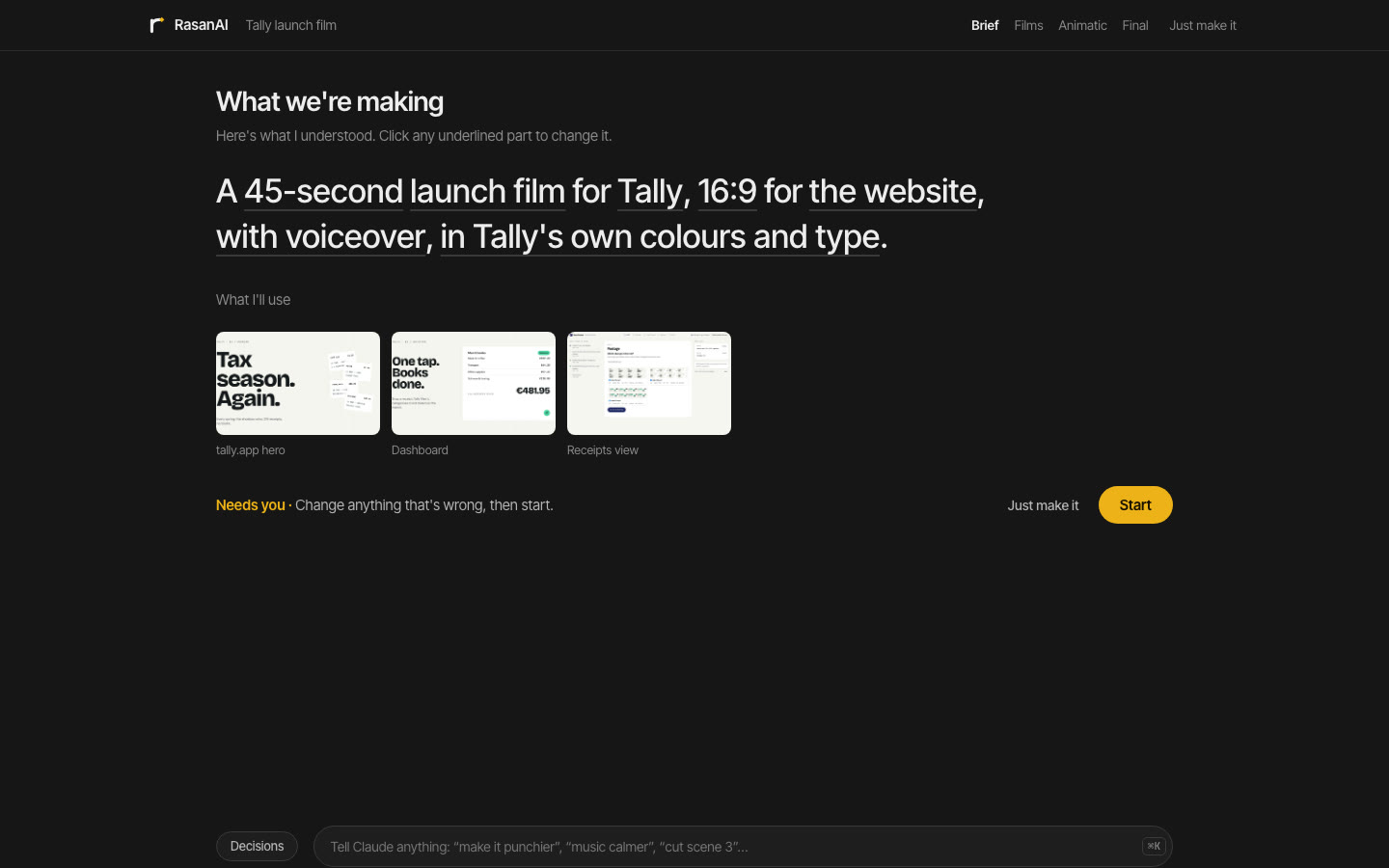
    One sentence you can edit: "A 45-second launch film for Tally, 16:9 for the website, with voiceover, in Tally's own colours and type", and what the research found: the product's real screens, words and brand, each with its source. With your permission, it also reads the product's code on your computer.

    Your callFix a word and press Start, or press Just make it.

    The Brief call in the Director's Console: one editable sentence describing the film, with the site captures Claude will use below it
  2. 2

    Story

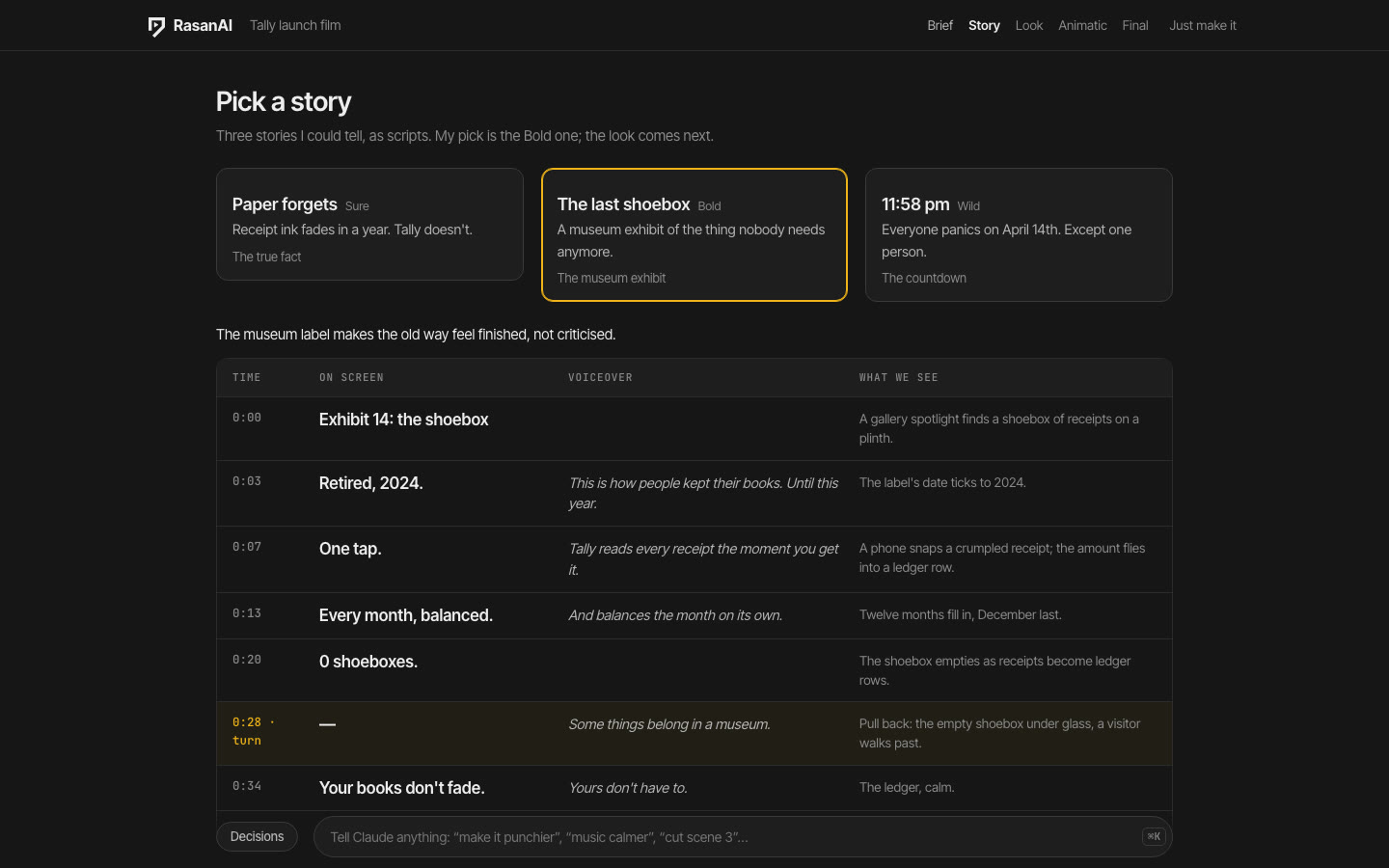
    Three scripts, Sure, Bold and Wild, written at the same time by three writers from your product's researched truth, then read by a hostile editor. Each is a title, a logline and every beat: what's on screen, what's said, what we see. No style yet.

    Your callPick one, or tell Claude what to change in a line.

    The Story call: three story tabs labelled Sure, Bold and Wild, and the selected story as a script table of timed beats with on-screen lines, voiceover and visuals, the turn highlighted
  3. 3

    Look

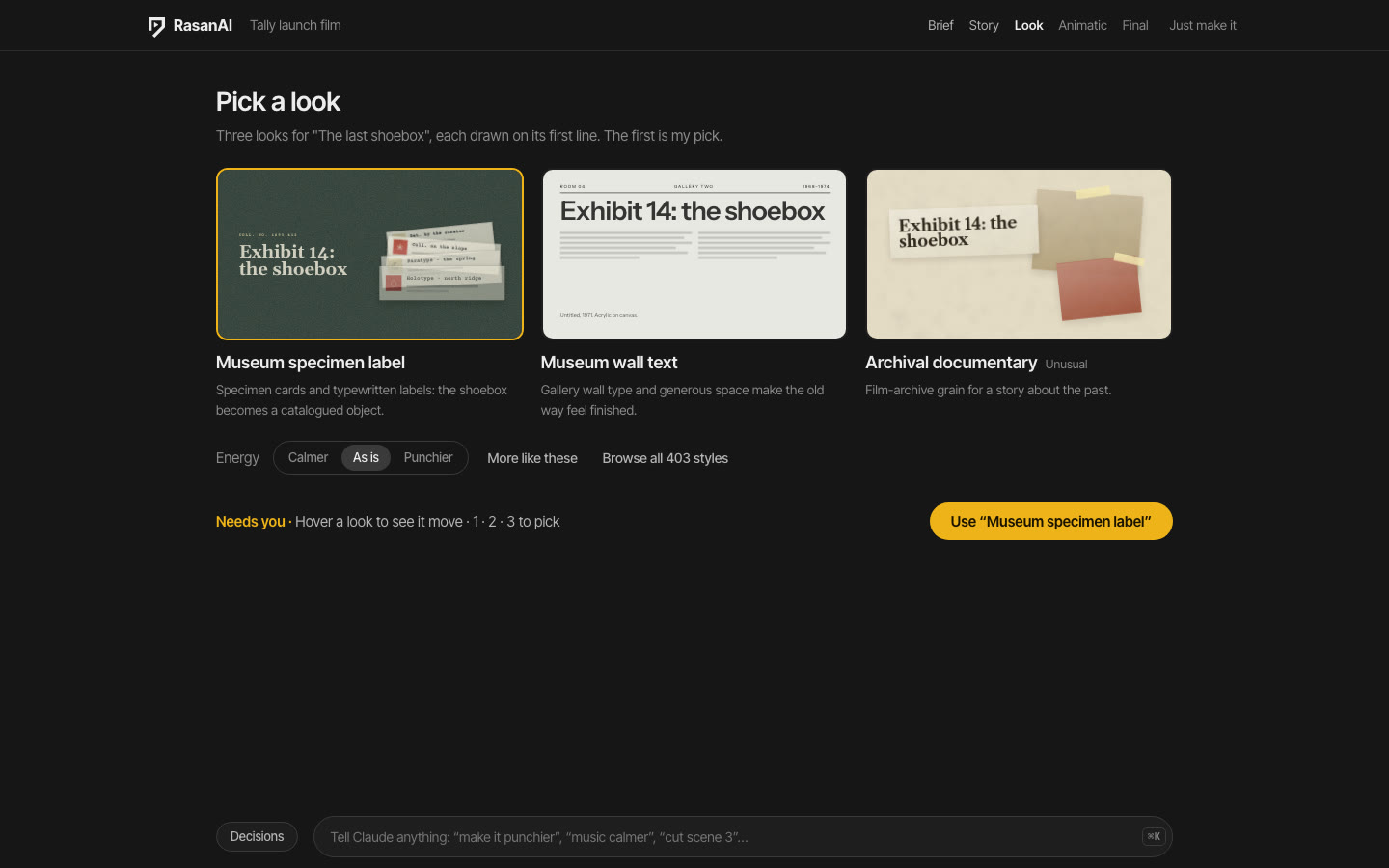
    Three design systems chosen for that story, each drawn live and moving on its own first line.

    Your callPick one, ask for more like these, turn the energy up or down, or browse every style.

    The Look call: three style tiles drawing the story's first line, museum specimen label, museum wall text and archival documentary, each with one line on why it fits
  4. 4

    Animatic

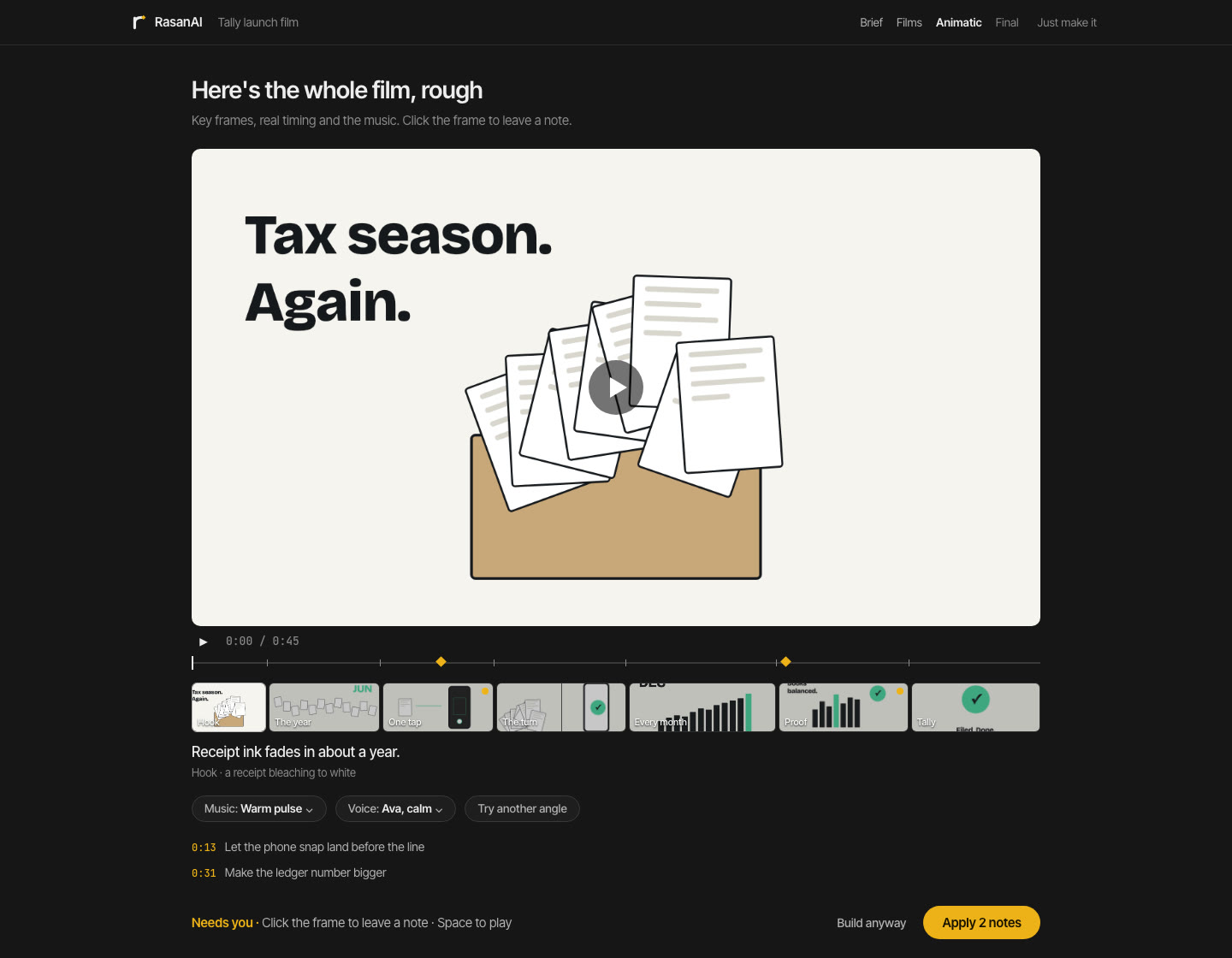
    The whole film, rough: a Motion Director has scored every shot and every seam, and every scene's key frame sits at its real duration, with the real music edit and the voice.

    Your callPlay it and click any moment to leave a note. Then one animator per scene builds them all at once while you watch.

    The Animatic call: the film's key frames on a timeline under a player, the music waveform beneath, and notes pinned to moments
  5. 5

    Final

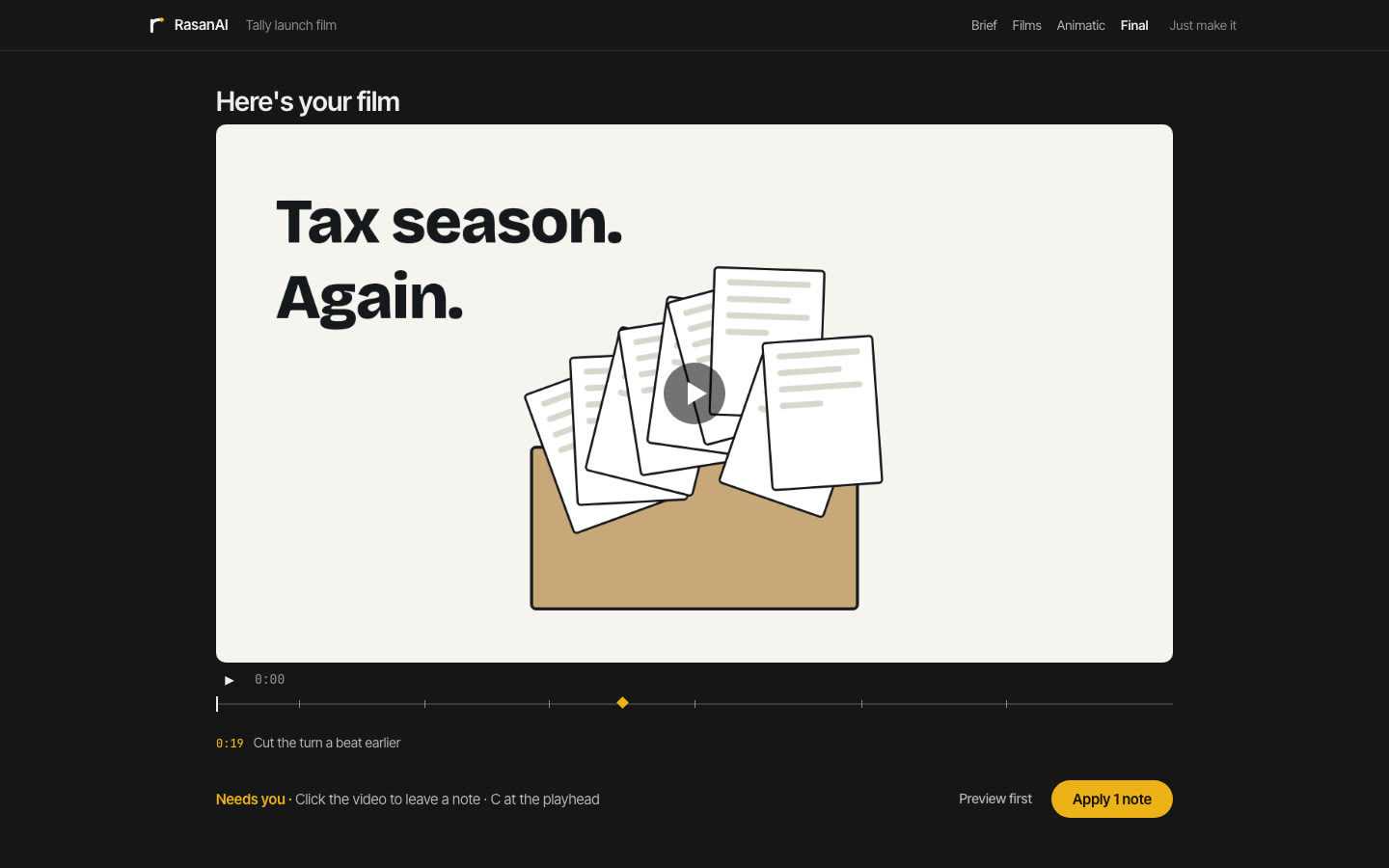
    The rendered film with scene markers, your notes, every version and what changed between them.

    Your callNote a moment, apply the notes, render and download.

    The Final call: the rendered film in a player with scene markers on the scrubber, a notes list and a version history

Claude decides the rest.

The craft is decided the way a senior motion designer would decide it, from a quantified playbook, and every call is listed in the Decisions drawer with its reason. Change any of it by telling Claude (⌘K) or leaving a note.

  • Research
  • Story device
  • Scenes
  • Motion score
  • Timing
  • Motion language
  • Transitions
  • Music edit
  • Sound effects
  • Lighting
  • Grade
  • HyperFrames workflow

Claude's pick is the most ambitious film that still tells the truth clearly. Every decision names the obvious option it passed over.

Decisionsevery call, with its reason
Story
The Museum Exhibit. The old way of doing taxes, shown as artifacts. Passed over: problem, then solution.
Style
Museum wall text. The story is an exhibition, so the film is a gallery wall.
Motion
Luxurious / slow: circ.out, 600 to 2800 ms, holds of 1.8 s or more.
Transitions
Hard cuts, and one match cut from the shoebox to the booked month.
Scenes
7 scenes in 45 s. The hook lands at 1.6 s; the end card holds 2.4 s.
Music
Edited to 45 s on bar lines. The reveal falls on the downbeat of bar 9.
Sound
4 effects, each on something you see: the lid, the stamp, the tap, the logo.
Light
A spotlight pool on each exhibit. Grade: clean neutral.

Under the five calls

What makes the films different.

A story picked from what is true

Before any concept, Claude writes a truth sheet from your product: what really changes, for whom, in its own words and numbers. From 66 narrative devices it pitches three films that differ on at least five of seven axes. A rubric rejects the default arc, and any pitch that would work for any product.

ExampleFor a bookkeeping app, The Museum Exhibit: the shoebox of receipts under glass (c. 2019), a placard for every late-night spreadsheet, and an empty plinth where tax season used to be.

403 design systems

Named styles in 20 families, from Swiss grids and risograph zines to split-flap departure boards. Each is a stack of taxonomy terms, a recipe drawn live on your words, a motion contract and a complete DESIGN.md. Claude matches the system to the story.

ExampleMuseum wall text: Instrument Sans on a pale gallery wall, one ultramarine field, no shadows, circ.out entrances of 600 to 2800 ms.

Music edited to the picture

Tracks long enough for the film, analysed with nothing but Node and FFmpeg for beats, bars, sections and a real ending, then cut on bar lines so the music never loops. The reveal and the logo land on downbeats. Sound effects only for visible events, on a budget. Mixed to −14 LUFS.

ExampleA 45-second film gets a track that ends at 45 seconds: one forward jump on a bar line into the real ending, and half a bar of near-silence before the reveal.

An anti-slop gate

Before anything reaches you, slop.mjs checks five kinds of tell. Copy: seamless, unlock, the not-X-it's-Y line, em dashes. Look: neon glow text, purple-blue gradients, particle filler, corner timecodes, Inter everywhere. Motion: idle loops, everything entering the same way. Timing: unreadable text, uniform shots, no end hold. Sound: loops, a whoosh per cut, loudness, dead air.

Examplegeneric-copy · error on the headline Unlock seamless bookkeeping. Fix: the real outcome, number or feature, in the product's own words.

Research before the story

A research crew reads the product's site, help center, changelog and brand pages, and collects its real screens with a measured UI kit. For a known brand it measures the brand's past launch films shot by shot. With your permission it also reads the product's code on your computer. Every fact on screen traces to a source; nothing comes from memory.

ExampleFor a ChatGPT film: the composer's real words and radius, the colours from its own stylesheet, and a note that the Plugins menu is gone, so no frame shows it.

One score, every scene in parallel

A Motion Director scores the whole film: the spine, the energy curve, every shot, every seam with exact handoff numbers on both sides, one signature move. Then one animator per scene builds them all at once, looks at its own motion frame by frame, and fresh-eyed critics judge the cuts, the facts and the film.

ExampleSeam 6 → 7: the source chip pushes through into the report; it leaves scene 6 at x 1210, scale 1.4, moving left at 900 px/s, and scene 7 picks it up exactly there.
ரசனை

rasanai /ˈrʌ.sə.nai/ · Tamil ரசனை, from Sanskrit रस rasa

  1. Taste; the eye (and ear) for what feels right. “Avarukku nalla rasanai”: they have good taste.
  2. From rasa: in Indian aesthetics, the feeling a work leaves in the person experiencing it. What is tasted, more than what is shown.

A video keeps its rasa in how it looks, moves, cuts and sounds. RasanAI is the rasanai: the taste to choose it, on purpose.

The style library

403 design systems. Pick one by eye.

Every style has a proper name and sits in one of 20 families: bold, soft, editorial, retro, future, handmade, 3D and materials, product, data, cinematic, playful, luxury, heritage, broadcast, science, print, interface, nature, music and scene, place and wayfinding. Each is drawn live on your own words.

Every style is a complete design system: colors by role, type, radii, shadows, components, the motion contract, and what to do and avoid. Download any card as a DESIGN.md and any agent or tool can build from it. With your DESIGN.md, the styles are drawn in your colors and type. Tap a card to see it move.

The whole library as files: systems/index.json lists every style with its DESIGN.md. Inside Claude Code, ask for any style by name: /rasanai export the Swiss grid style as a DESIGN.md.

Your brand

Bring your DESIGN.md.

If your project has a brand reference, it becomes the look. All three films are drawn in its colors and type, and the brief sentence says so. Ask for a new look and the styles use their own colors instead.

  • Reads the common shapes: design.md spec frontmatter with oklch() colors and nested typography, impeccable and gstack files, Stitch-style prose, CSS custom properties, token tables with or without #.
  • Gives every color a role (canvas, ink, accent, surface, muted, status) from its name and comment, then contrast. A saturated "text accent" never becomes the ink; status colors never become the accent.
  • Finds the fonts, skips "banned" ones, maps platform fonts the renderer doesn't have (SF Pro → Inter, SF Mono → JetBrains Mono, Calibri → Carlito) and says so.
  • Writes a frame.md HyperFrames accepts, checks it with HyperFrames' own parser, and stages every font file into the project.

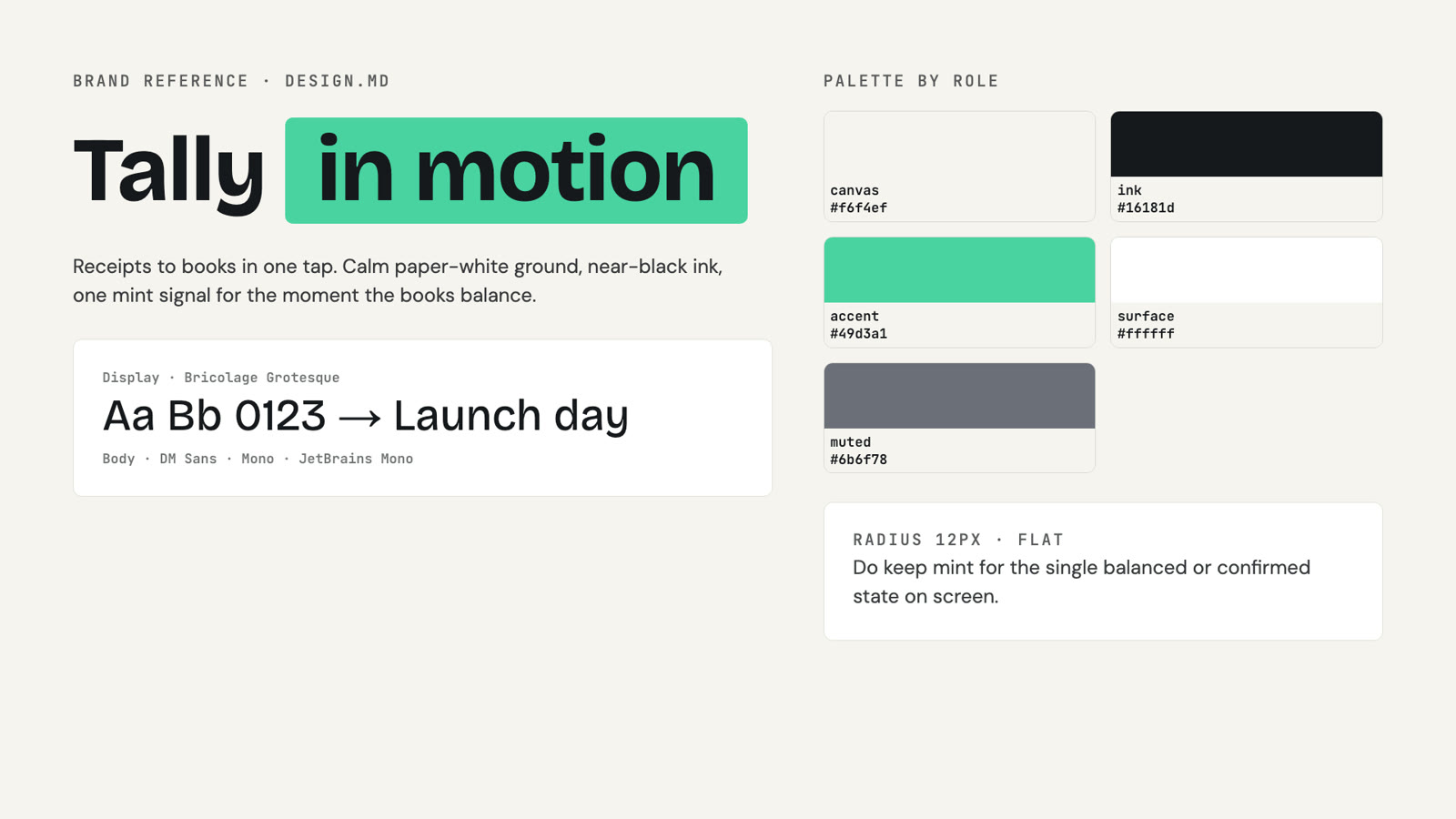
See an example DESIGN.md

A brand board read from Tally's DESIGN.md: the wordmark, the palette by role (canvas, ink, a mint accent, surface, muted), Bricolage Grotesque and DM Sans, radius 12px
What RasanAI read. Colors by role, the fonts, the radius, and the one rule for the accent.

The vocabulary

A film is a stack of decisions.

Two pieces can both be "2D UI animation" and look nothing alike. RasanAI holds the vocabulary of motion design as data: 32 dimensions and 926 terms, each with a definition, what it looks like, how it moves, where it's used, what it's confused with, and the instruction Claude follows.

Every decision Claude makes, and every prompt to a builder, is written in these terms. A film vocabulary turns each one (a rack focus, a bleach-bypass grade, a J-cut) into an HTML, CSS and GSAP recipe with numbers. Share a screenshot or a video you like and Claude reads it into the same terms.

Format & tone

Format (66) · Tone (29)

product launch film · feature reveal · logo sting · concept explainer · kinetic typography · title sequence · confident · premium · playful

What's on screen

UI treatment (44) · Product demo (28) · UI interaction (51) · Data viz (23) · Photo & video (21) · Illustration (40) · Character (17)

simplified UI · exploded UI · bento UI · terminal UI · cursor-driven demo · input → output · number counter · flat vector

Look

Visual style (77) · Era (22) · Color (28) · Typography (24) · Composition (34) · Material (31) · Texture (28) · Shape · Stroke · Shadow · Depth · Iconography

Swiss / International · neo-brutalism · risograph · soft 3D · Y2K · grotesk · duotone · hard offset shadow · film grain

Light & grade

Lighting (22) · Color grade (23)

key, fill and rim · low-key · window light · neon practicals · volumetric god rays · bleach bypass · teal-orange · Kodachrome · day for night

Motion

Motion language (32) · Motion function (24) · Transitions (44) · Camera (24) · Effects (34) · Production (25)

precise · springy · cinematic · stop-motion-like · UI morph · match cut · mask reveal · push-in · parallax

Story & sound

Narrative (24) · Pacing (18) · Sound (15)

statement → evidence → payoff · feature montage · beat-driven · voiceover-synchronized · music-led
DIRECTION.mdcompiled from the chosen film
# Direction: Swiss / International Typographic Style,
  simplified-UI product launch film, precise motion

Style formula
Format / purpose: Product Launch Film
        ↓
Emotional / brand tone: Confident + Friendly
        ↓
UI treatment: Simplified UI
        ↓
Visual style: Swiss / International Typographic Style
        ↓
Typography: Grotesk
        ↓
Motion language: Precise

### UI treatment: Simplified UI
Simplified UI. The real interface with non-essential
detail removed.
- Do: keep its true layout and hierarchy; remove
  secondary controls, dense data and placeholder text…
- Not to be confused with: Abstracted UI keeps only
  the one control that matters…
Energetic neo-brutalist 2D interface animation
  1. neo-brutalist UI
  2. heavy stroke · hard offset shadow
  3. high contrast · color blocking
  4. snappy motion
  5. hard cuts · push · fast pacing
Luxury minimal reveal
  1. high-contrast serif
  2. dark UI · limited palette
  3. negative space · single-object hero
  4. luxurious / slow motion
  5. dissolve · light wipe
Technical monochrome developer-tool animation
  1. terminal UI · monospace
  2. black and white
  3. technical diagram
  4. precise · linear motion
  5. hard cut · wipe

The compiled direction goes to every builder: into frame.md, into every scene's work packet with the motion contract, and into every reel card's brief.

The motion

A motion language, with a contract.

"If these graphics were alive, what laws would they follow?" Each of the 32 motion languages is a term with a binding contract: its eases, the durations allowed, the stagger, the minimum hold, and the moves it bans. The chosen style's language becomes motion.md.

Every language's swatch passes the same checker the real build must pass, so what you see is what's enforced. One language governs the whole film; scenes differ only in intensity.

Preciseexpo.out / expo.in · 200–1000 ms · stagger 80 · hold 900Exact, grid-locked destinations, zero overshoot.
Springyback.out(1.7) / power3.in · 180–1100 ms · stagger 40A damped spring: fast attack, one overshoot, quick settle.
Cinematicpower2.out / power2.inOut · 400–2400 ms · hold 1400Slow push-ins and breathing holds.
Snappypower4.out / power3.in · 120–720 ms · stagger 50Steep initial velocity, very short settle.
Luxurious / slowcirc.out / circ.in · 600–2800 ms · hold 1800Restraint as the signal of value.
Stop-motion-likesteps(6) / steps(4) · 12 fps · hold 750Held poses on twos, like physical stop-motion.
The same lines in six motion languages, side by side, in one look
The same lines in six languages. The chosen language's contract then governs every scene Claude builds.

Who makes it

A crew makes every film.

Claude is the director. A crew of agents does the work, each with its own brief and a check its work must pass. The crew never talks to you, and nothing on screen comes from memory.

Researchers read the product's site, help center, changelog and brand pages, and measure its past launch films shot by shot. Three writers pitch against each other. A Motion Director scores how the whole film moves. Then one animator per scene builds them all at once, and each looks at its own motion frame by frame before handing it back. Every creative brief ends the same way: show off. Claude's unpushed default is competent and forgettable, and the critics are told to fail it.

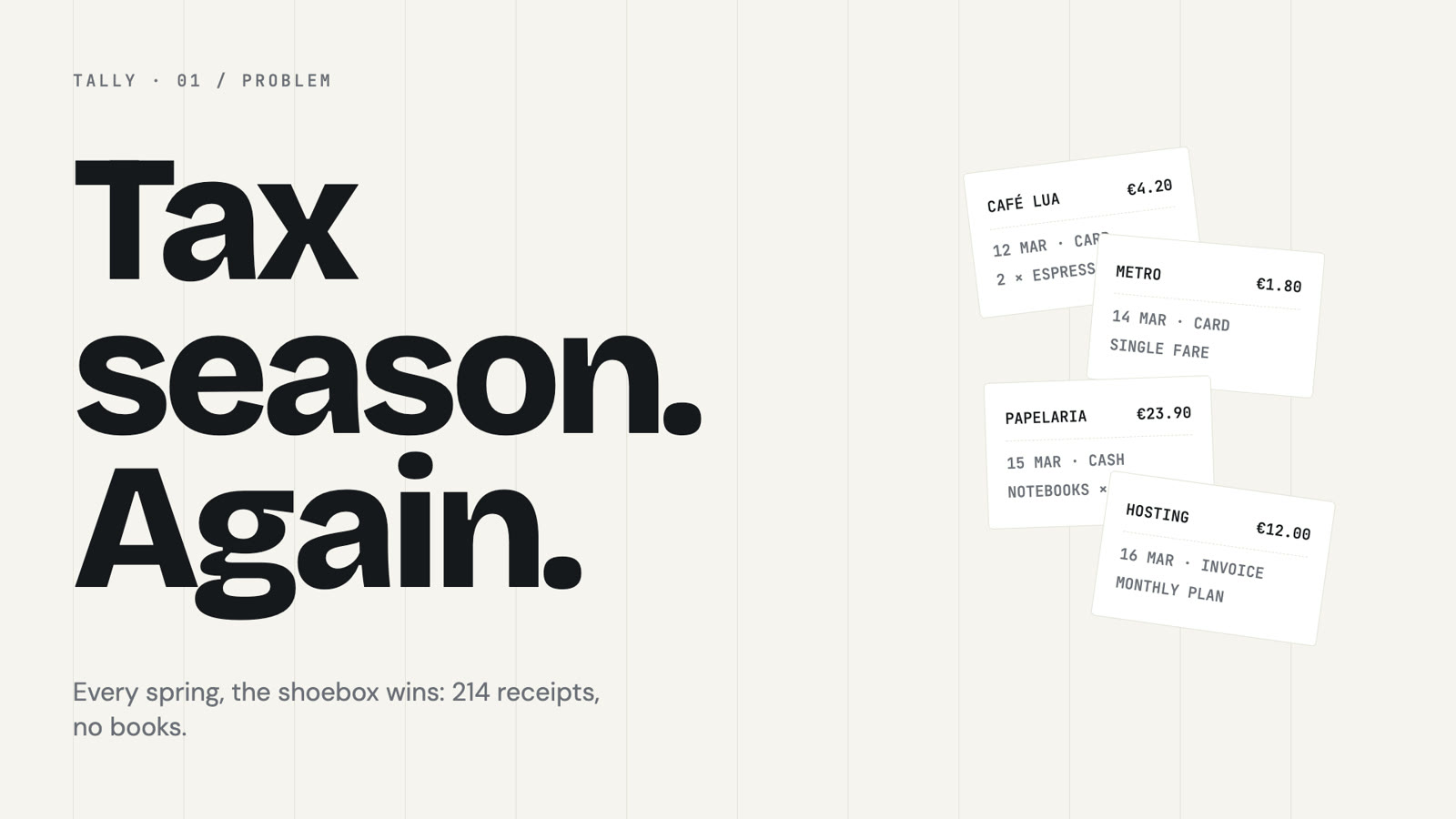
A key frame Claude designed: Tax season. Again. on a Swiss grid, receipts piled on the right
Key frame: the hook. Swiss grid, grotesk, the brand's paper and ink.
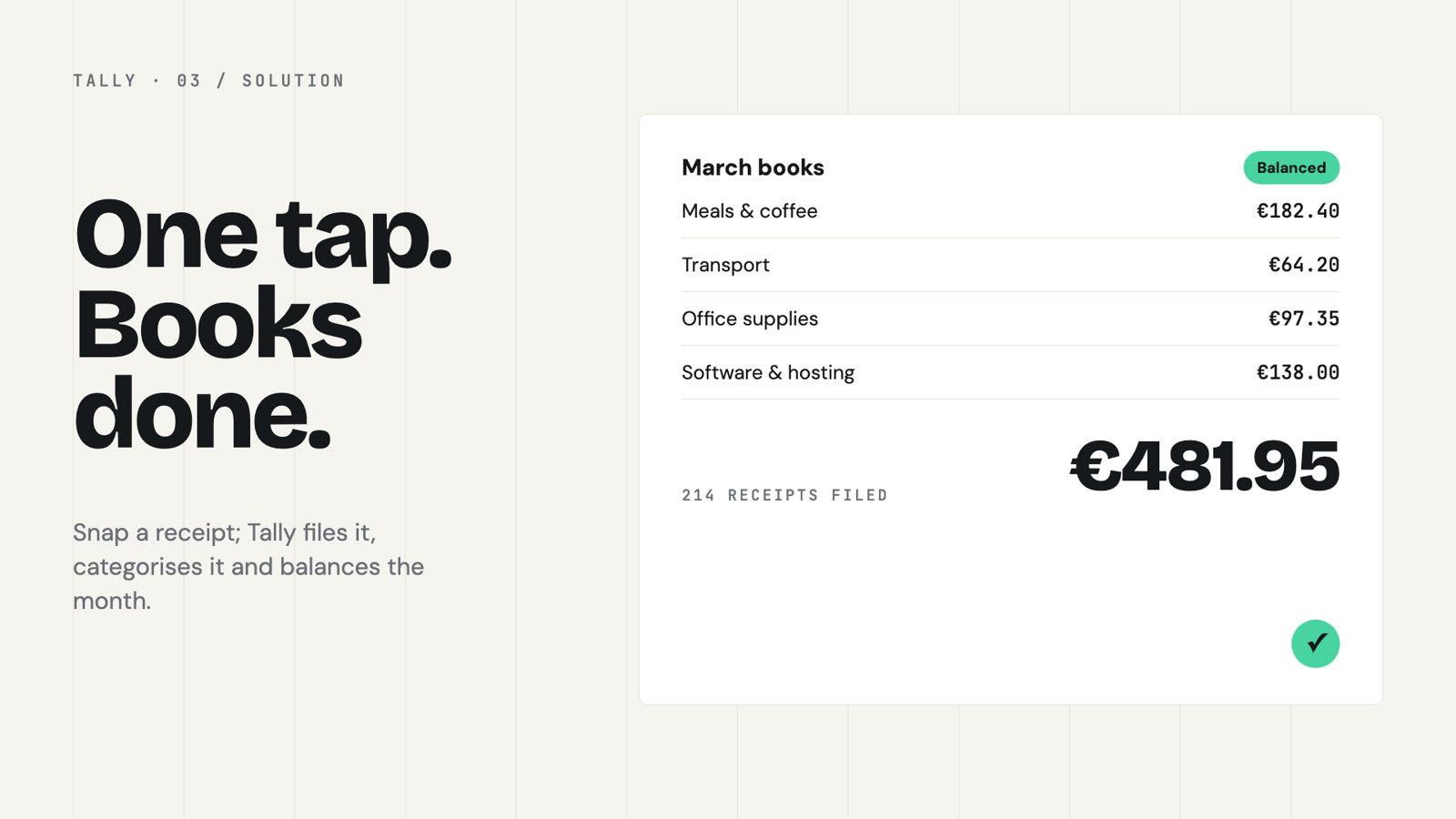
A key frame: simplified product UI with March books balanced and a single mint accent
Key frame: the product. Simplified UI, one mint accent for the balanced state.
  1. ResearchProduct, brand, real screens, past films, and your local code with permission; merged into one truth sheet
  2. Writers' roomThree writers, one script each, and an editor who reads like a hostile client
  3. Motion scoreEvery shot, every seam with exact handoff numbers, 2 to 4 showreel moments
  4. AnimatorsOne per scene, in parallel, building toward the approved key frame
  5. CriticsFresh eyes on frames, motion, facts and film; competent but safe is a fail

Every kind of video

Whole films, from any source.

RasanAI hands the approved plan to the HyperFrames workflow that fits, pre-writing what it reads (the brief, the storyboard and script in its exact format, frame.md, the music edit), so it asks nothing and re-decides nothing.

Launch filmproduct-launch-video

From a product URL: capture, story, scenes, voice, music.

Explainerfaceless-explainer

A topic, article or how-to, told with invented visuals.

PR videopr-to-video

A pull request as a changelog film, code excerpts and all.

Custom piecegeneral-video

Brand films, montages, anything multi-scene.

Music videomusic-to-video

Cut to a track's beat grid; lyric videos.

Footage reelreel

A folder of your clips, cut together with cards and captions.

Captions & overlaysembedded-captions · talking-head-recut

A talking-head clip, captioned or recut with designed cards.

Motion graphicsmotion-graphics

A title, sting, stat hit or lower third.

Videos only. For a talk, RasanAI makes the video that plays in it; the deck is source material.

Footage

Point it at a folder of clips.

RasanAI examines every clip (length, orientation, frame rate, sound, a contact sheet, shot changes, silences and a word-level transcript), then Claude drafts the cut, cutting on word boundaries.

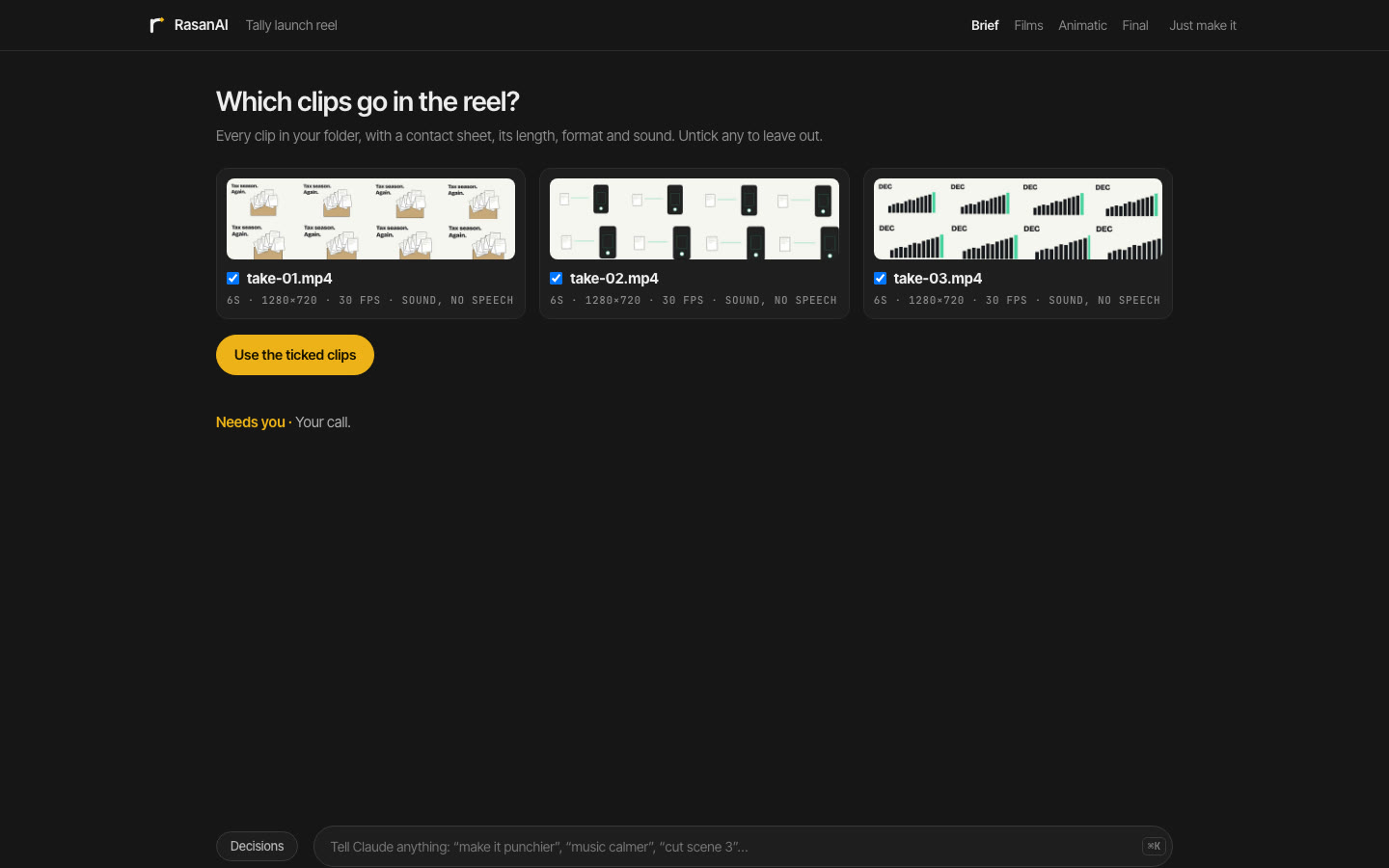
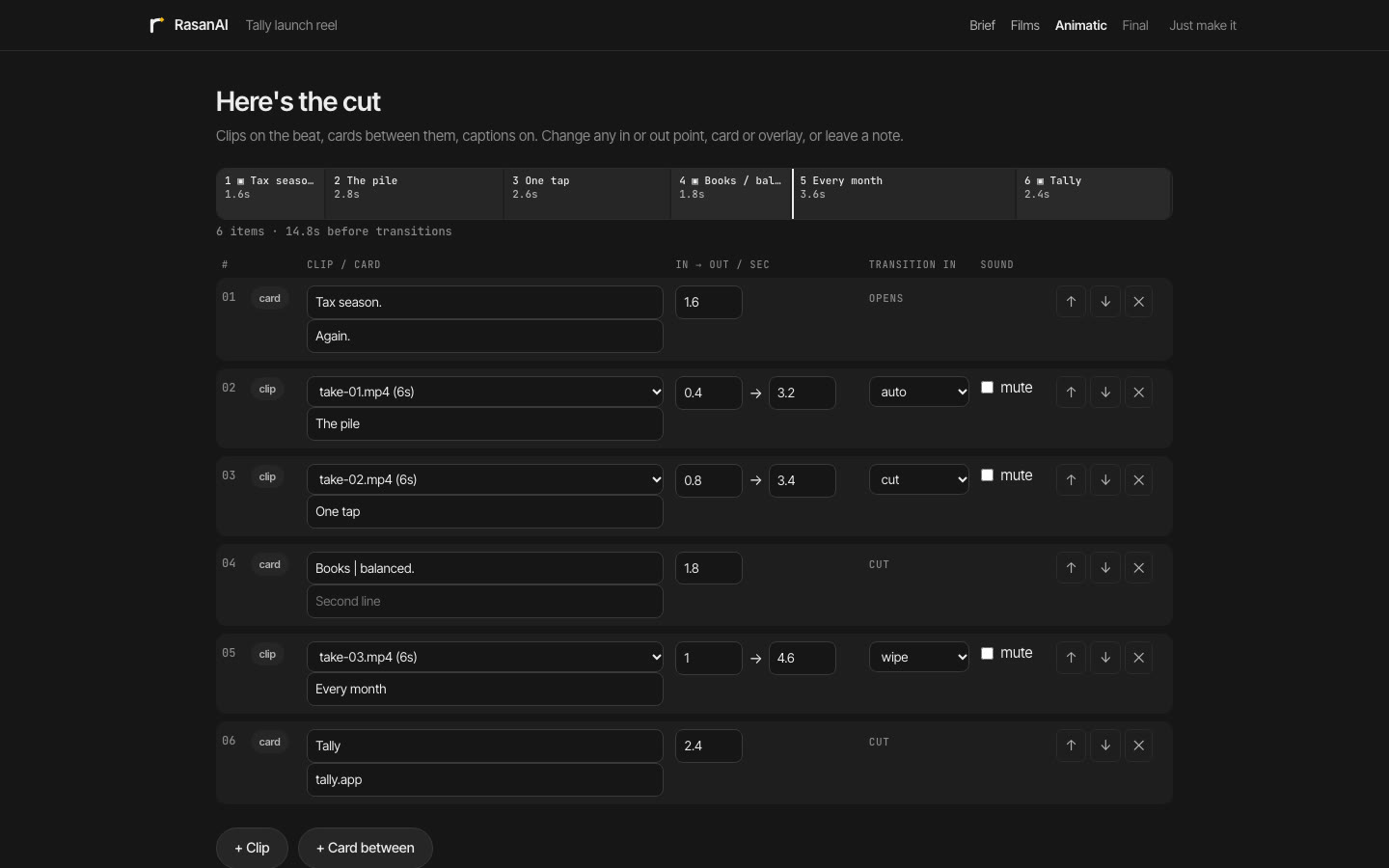
A reel adds two calls: Footage, where you untick clips to leave out, and Cut, the reel's animatic, where you edit the list: in and out points, order, cards between clips, overlays, captions from what's said, a music bed that ducks under speech. Claude designs and animates every card and overlay.

The Footage step: each clip with its contact sheet, length, format and sound
Footage. Every clip, with what's in it and what's said.
The Cut step: clips with in and out points, cards between them, overlays and captions
Cut. The edit as a list you can change, with a draft to watch.

The checks

Checked before you see it.

A film ships only after four gates pass: the story rubric, the anti-slop gate, the motion contract and the sound check. Then critics who never saw it being made judge it fresh. The motion check walks every tween of every scene in a real browser and compares it with the contract.

  • Durations on the language's scale, eases from its set, written explicitly, never the GSAP default.
  • Banned moves caught in every form, including the generic fade-up-slide.
  • Holds long enough to read; GSAP only, seekable, deterministic.
  • Sound at −14 LUFS, no audible loop, effects within budget, no dead air.
  • Critics score the frames, the motion, the facts and the film, ambition included, with an exact fix for each problem.
  • Failures go back to the scene's animator, at most twice; anything left is yours to fix or waive at the Final. A check that couldn't run is never reported as a pass.
node obey.mjs --project videos/tally-launchreal checker output
obey: violations — 2 tweens (0 exempt) in 1 file(s); 2 error(s)
  [ERROR] ease-outside-set compositions/frames/01-shoebox.html
      h1.headline "Tax season. Again." @0.20s 800ms ease=power4.out
      ease power4.out is not one of motion.md's eases
      fix: use ease: "expo.out"
  [ERROR] banned:fade-up-slide compositions/frames/01-shoebox.html
      h1.headline "Tax season. Again." @0.20s 800ms ease=power4.out
      fix: replace with one of motion.md's entrances

# after the repair pass
obey: clean — 8 tweens (0 exempt) in 1 file(s); 0 error(s)

Install

Needs Claude Code, Node.js 20 or newer (RasanAI fetches a private copy if you have none), the HyperFrames skills (npx hyperframes skills update), and FFmpeg for music and footage.

Claude Code plugin

From inside Claude Code.

> /plugin marketplace add Sibhimanyu/rasanai
> /plugin install rasanai@rasanai

skills CLI

From your terminal.

$ npx skills add Sibhimanyu/rasanai --skill rasanai

One-line installer

Clones and links the skill.

$ curl -fsSL https://raw.githubusercontent.com/Sibhimanyu/rasanai/master/install.sh | bash

Then try

> /rasanai make a 45s launch film for https://tally.app
> /rasanai a 60s explainer on how DNS works, vertical, no voiceover. Just make it.
> /rasanai cut ~/Footage/lisbon into a 30s reel with a title card and captions
> /rasanai export the Swiss grid style as a DESIGN.md

RasanAI updates itself when the skill loads. Check the install with node ~/.claude/skills/rasanai/scripts/selftest.mjs (85 checks, no network needed).

Questions

What do I actually decide?

Five things: the brief (one sentence), which of three scripts to tell, which of three looks to make it in, notes on the animatic, and the final. Everything else is craft, and Claude decides it. If a question would need expertise to answer, RasanAI doesn't ask it.

Can I change what Claude decided?

Yes. Every call is in the Decisions drawer with its reason and the obvious option it passed over. Tell Claude (⌘K) or leave a note on a moment in the animatic or the final, and it changes only what the note points at.

Who actually animates the video?

Claude. The style specimens in the console are for choosing by eye. Claude designs the key frames, the scenes and the reel cards from the chosen film, HyperFrames renders them, and the gates confirm the motion, copy and sound before you see the result.

Do I need to know motion-design terms?

No. You choose by watching and listening. Claude works in the terms, because they make the result precise: "simplified UI, grotesk, precise motion, UI-morph transitions" builds something very different from "make it modern".

Why do the three films look so different from each other?

Because they are different films. Each pairs a different story device with a design system from a different family and its own music feel, and the three pitches differ on at least five of seven story axes. Your recent styles and devices rotate out, so ten films never settle into one house style.

Can I use a style outside RasanAI?

Yes. Every style in the library downloads as a DESIGN.md (colors by role, type, radii, shadows, components, the motion contract), which any agent or design tool can build from. The link is on each card above.

Can it use my brand?

Yes. Put your DESIGN.md (or design.md) in the project. RasanAI reads it, gives every color a role, and draws all three films in your colors and type.

Can I skip everything?

Yes. Say "just make it" and Claude decides every call up to the Final, which always runs so you can review before the render. Only the source (what the video is about) is required.

Does anything leave my machine?

The console runs on 127.0.0.1 with a per-session token and serves files only from your workspace. Music analysis runs locally with Node and FFmpeg. Site capture, voice samples, music and fonts go through HyperFrames' tools, Google Fonts or Fontshare; nothing else leaves your machine.

What's the license?

MIT. The vendored GSAP stays under its own GSAP Standard License.